XTS 2014-2020

Cadillac

Installation Instructions:

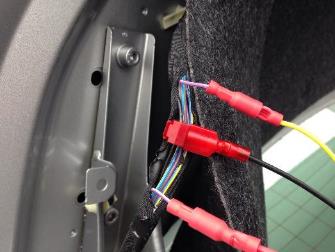
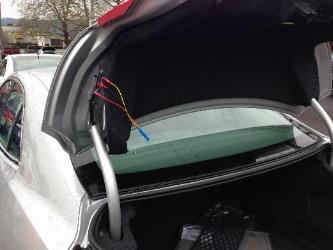
Open the trunk lid. Remove the pin from the trunk lining on the driver side. Pull the cover to the side. The wires will be in the harness running into the trunk lid. There is one violet/white wire and two violet/gray wires in the harness. Be sure to grab the violet/white.

Additional Information:

None

  • Positive Wire:

    Violet/White
  • Ground Wire

    Black

About wire colors:

In the event a wire has two colors listed, the first color is the base wire color. The second color is the tracer. For example, if the positive wire color is listed as "black/red." This means the wire is black with a red stripe.

Search Guides

Use your preferred search method to find the exact guide you're looking for—you can select a make, or type a search with make, model, and/or year.

MAKE SEARCH

TEXT SEARCH

 Save as PDF

NOTE: This action may take several minutes to complete.

TROUBLESHOOT

Are you having issues with installation? Check out our troubleshooting guide for common errors associated with the installation of Brake Plus modules.

ERRORS?

Do you feel there's an error in this installation guide? If so, please take a moment to tell us what you notice by calling our Installation Manager.

Troubleshooting Guide

Having issues? This guide can help you solve common issues with installation.

TOP